

Windows 7 SSD's Setup and Secrets

Now what do our Overclock Guru's have to say.
NOTE: To install Win7 on a SSD only have the SSD and DVD/CD connected, do not have any other hard drives connected. Make sure your BIOS is set to boot off the DVD. After you get your OS installed set your BIOS back to boot off the SSD. After you get your OS running fine off your SSD then you can hookup the rest of your Hard Drives.
Quote:
BTW. Two Cables informed me that he got this info from lsdmeasap
Much love to you and all.
Quote:
Quote:

Now what do our Overclock Guru's have to say.
NOTE: To install Win7 on a SSD only have the SSD and DVD/CD connected, do not have any other hard drives connected. Make sure your BIOS is set to boot off the DVD. After you get your OS installed set your BIOS back to boot off the SSD. After you get your OS running fine off your SSD then you can hookup the rest of your Hard Drives.
Quote:
If this helps you send some love to "Two Cables" for his wisdom.Change from IDE to AHCI Mode after Windows 7 Installation
AHCI stand for Advance Host Controller Interface. AHCI is a hardware mechanism that allows software to communicate with Serial ATA (SATA) devices (such as host bus adapters) that are designed to offer features not offered by Parallel ATA (PATA) controllers, such as:
Hot-Plugging and Native Command Queuing (NCQ) -might improve computer/system/hard disk responsiveness, especially in multi-tasking environment
There is one way to fix this, although you need to have knowledge of registry editing. The detailed steps from Microsoft website are as follows:
(1) Exit all Windows-based programs.
(2) Press [Win] + R or take the RUN option from the start menu.
(3) Now type regedit there and press Enter Key to open up the Registry Editor Window. (If you receive the User Account Control dialog box, click Continue.)
(4) Locate and then click the following registry subkey:
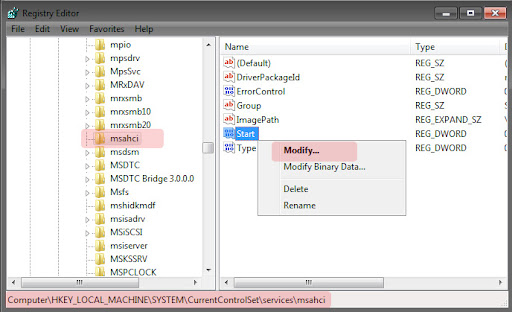
HKEY_LOCAL_MACHINE\System\CurrentControlSet\Services\msahci
(5) In the right pane, right-click Start in the Name column, and then click Modify.

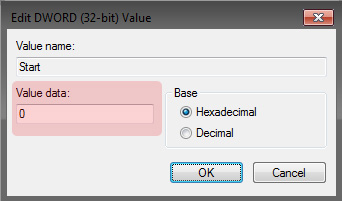
(6) In the Value data box, type 0 [3 is default], and then click OK.

(7) On the File menu, click Exit to close Registry Editor.
(8) Restart your computer
(9) Go to BIOS and enable AHCI, Save & Reboot
(10) Another restart will be required to finish the driver installation.
Now you are ready to enter the bios and Work some real magic.
(1) Check the board is in AHCI mode, if no option is available there is nothing you can do.
(2) Check if S1 and S3 sleep are supported in bios, I usually set S1 but S3 should be ok also....if they are not in bios there is nothing you can do
(3) Check ACPI 2.0 is in bios and enabled, if its not in bios there is nothing you can do.
(4)
Quote:
This will prevent Windows 7's installer from creation that 100MB partition, and it will also be properly aligned!Originally Posted by TwoCables;11028564
I think that the installer doesn't align it properly to begin with. Here's a method that was recently taught to me that I guarantee will work perfectly to properly align a solid state drive:
(5) Check and see if there is an Update to the FIRMWARE of you SSD and Update if necessary.
So to summarize:
- To make things easy, disconnect all other drives (but leave any optical disc drives connected)
- Boot from the Windows 7 installation DVD
- When you see the "Install now" button, click "Repair your computer"
- You'll see a little window named "System Recovery Options" appear that searches for Windows installations.
- When it finishes, you will see a dialog box. Select "Use recovery tools that can help fix problems starting Windows. Select an operating system to repair.", and then click Next.
- Click "Command Prompt"
- Type diskpart to load DiskPart
- Type list disk
- Type select disk 0 (or whichever number your SSD gets)
- If you want to be sure you have the right one selected, then type list partition.
- Once you know you have the right drive selected, type clean.
- Type create partition primary align=1024
- Type format quick fs=ntfs
- It will appear like it's going to take forever, but then like 5-10 seconds later, it suddenly finishes, jumping straight from 0% to 100%.
- Type active
- Type list partition to see your creation.

- Type exit
- Type exit
- Click Restart
- Boot from the DVD again and perform a normal installation using the "Custom (advanced)" type of installation.
Immediately after installing Windows:
- Get to that Command Prompt
- Type diskpart
- Type list disk
- Type select disk 0 (or whichever number it turns out to be)
- Type clean
- Type create partition primary align=1024
- Type format quick fs=ntfs
- Type active
- Type exit
- Type exit
- Click Restart
- Install Windows 7
(1) Turn Off Hibernation File: Type cmd in search, right click cmd symbol that comes up and choose "run as administrator". Type "powercfg -h off" and press enter.
OPTIONAL BUT RECOMMENDED SHORT STROKE DRIVE 25%: control panel/administrative tools/computer management/storage/disk management/ right click on C drive/ shrink volume follow instructions to shrink volume shrink so you have 25% unallocated space minimum. Helps drive maintain its self at higher performance and helps overall drive life.
(2) OPTIONAL BUT HIGHLY RECOMMENDED: Turn off paging file: control panel/ system/advanced system settings/performance settings/advanced/virtual memory/change click no paging file, click set, apply, ok. (Restart later) Note: if you want to use a paging file for some reason set the minimum size to 1000mb and the maximum size to 1000mb. (Restart Later)
(3) OPTIONAL BUT HIGHLY RECOMMENDED: Turn off system protection: control panel/ system/system protection make sure all drives are off especially C. You can make system images so system protection is just a giant waste of disk space.
(4) Turn off drive indexing: Right click all drives and uncheck drive indexing, click apply (ignore all when comes up) Also go to windows storage manager select the system reserved partition right click uncheck drive indexing, click apply (ignore all when comes up).
(5) OPTIONAL: Turn off Recycle Bin or reduce in size.
(6) Turn Off Reliability Monitor: Admin tools, open task scheduler. expand task scheduler library, then Microsoft, then Windows. Scroll down and click on RAC. Go to the top and select View then show hidden tasks IF RACTASK is not showing. Right click on RacTask and select disable. To re-enable it, you right click it and select enable.
Here is the good part.... disabling it stops it from PROCESSING reliability data and errors for reliability viewer. The data is still collected in the logs, just stored efficiently. You can re-enable it and see the reliability stuff when U wish. Disabling it saved RAM and some drive churning until U need to look at it.
(7) Set the power state to high performance and set the machine to never sleep, HDD power down to OFF (off is before 1 minute).
(8) Disable SuperFetch: Type regedit in search, click on symbol then go HKEY_LOCAL_MACHINE\SYSTEM\CurrentControlSet\Contro l\Session Manager\Memory Management\PrefetchPerameters right click EnableSuperfetch hit modify and change to 0 and hit OK. (NOTE: alot of people also disable prefetch as well as superfetch but i find system runs better with prefetch enabled).
(9) Enable Large System Cache: Go to HKEY_LOCAL_MACHINE\SYSTEM\CurrentControlSet\Contro l\Session Manager\Memory Management right click LargeSystemCache hit modify and change to 1 and hit OK.
(10) Go to: HKEY_LOCAL_MACHINE\SYSTEM\CurrentControlSet\Control\FileSystem right click NtfsDisable8dot3NameCreation hit modify and change to 1 and hit OK then right click NtfsMemoryUsage hit modify and change to 2 and hit OK.
(11) Disable SuperFetch in services: Go to Control Panel select Administrative Tools\Services double click SuperFetch select startup type as disabled then click ok.
(12) While in Services double click Disk Defragmenter select startup type as disabled then click ok.
Now Restart Your System For The First Time then:
(1) Install Chipset Drivers.
(2) Use win7 native AHCI (Will be automatically installed by windows during installation) driver for AMD. Use the newest Intel RST driver (Download and install after windows installation. Note INTEL Chipset Drivers should be installed first then RST driver.)for INTEL systems.
(3) RESTART
(4) Enable windows write back catching on C drive: right click C drive/hardware/your drive/ properties/change settings/policies/ check turnoff windows write-caching buffer flushing.......................


BTW. Two Cables informed me that he got this info from lsdmeasap
Much love to you and all.
Quote:
A Word about Indexing..
Quote:




 and then click Configure. That allows you to configure settings. As you can see here, I've adjusted the amount of reserved space so that it uses only 3% of the total disk. That's enough to save a handful of restore points-enough to get out of trouble in the event of a failed driver installation.